How it works · Revit to COMcheck export · Real screenshots
From the Revit model to an Envelope Compliance Certificate.
Can you export a Revit model to COMcheck? Yes, for the building envelope. BIM Pro AI is a Revit add-in that automates the Revit envelope export for COMcheck. It scans walls, roofs, floors, doors, and windows, lets you check every area and U-factor in Revit, and saves a COMcheck-compatible .cxl export you upload to legacy COMcheck-Web. COMcheck runs the compliance check and issues the report. A licensed professional reviews what gets submitted. BIM Pro AI is an independent product and is not affiliated with or endorsed by the U.S. Department of Energy, PNNL, or COMcheck.
Every screenshot on this page is from one run on a demo model, BIMPRO-Warehouse-Office: a 72,182 SF semiheated warehouse with a 3,010 SF conditioned office, checked against 90.1 (2013) Standard. Nothing here is a mock-up.
- Revit elements scanned
- 173
- Model QA passed, warnings, serious
- 47 / 0 / 0
- Envelope components exported
- 26
- Envelope result in COMcheck-Web
- Passes +5%
1 · Setup
Tell it what the project is.
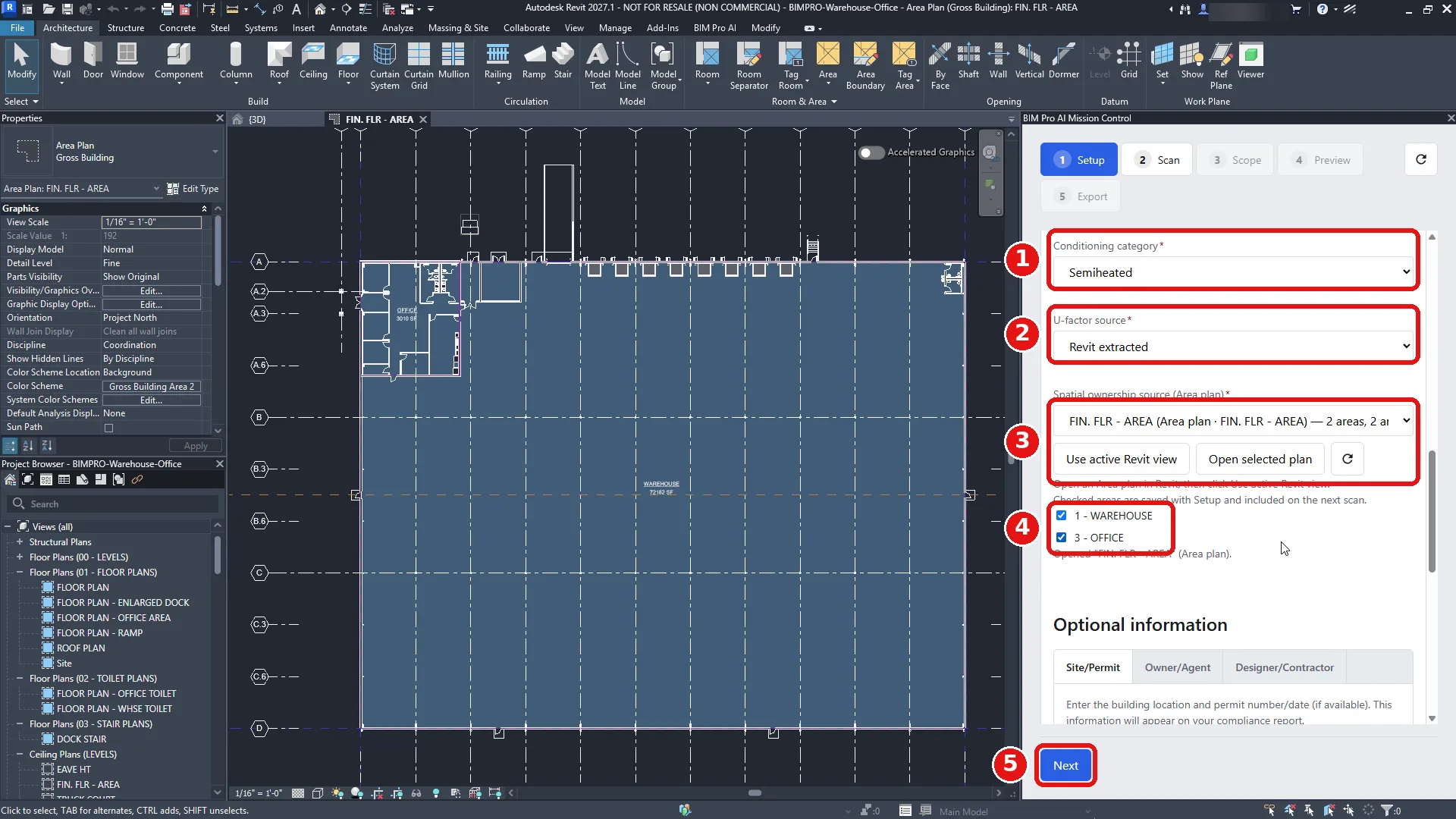
Project type, code edition, and envelope family come in from the model. You fill the few things Revit cannot know: finish grade elevation from civil, building and conditioning category, and where U-factors come from.
Then point it at the Area Plan. The areas you check are the spaces that get reported. Next stays disabled until every required setting is filled, and the panel says which one is missing.
2 · Scan
Read the model, then check it.
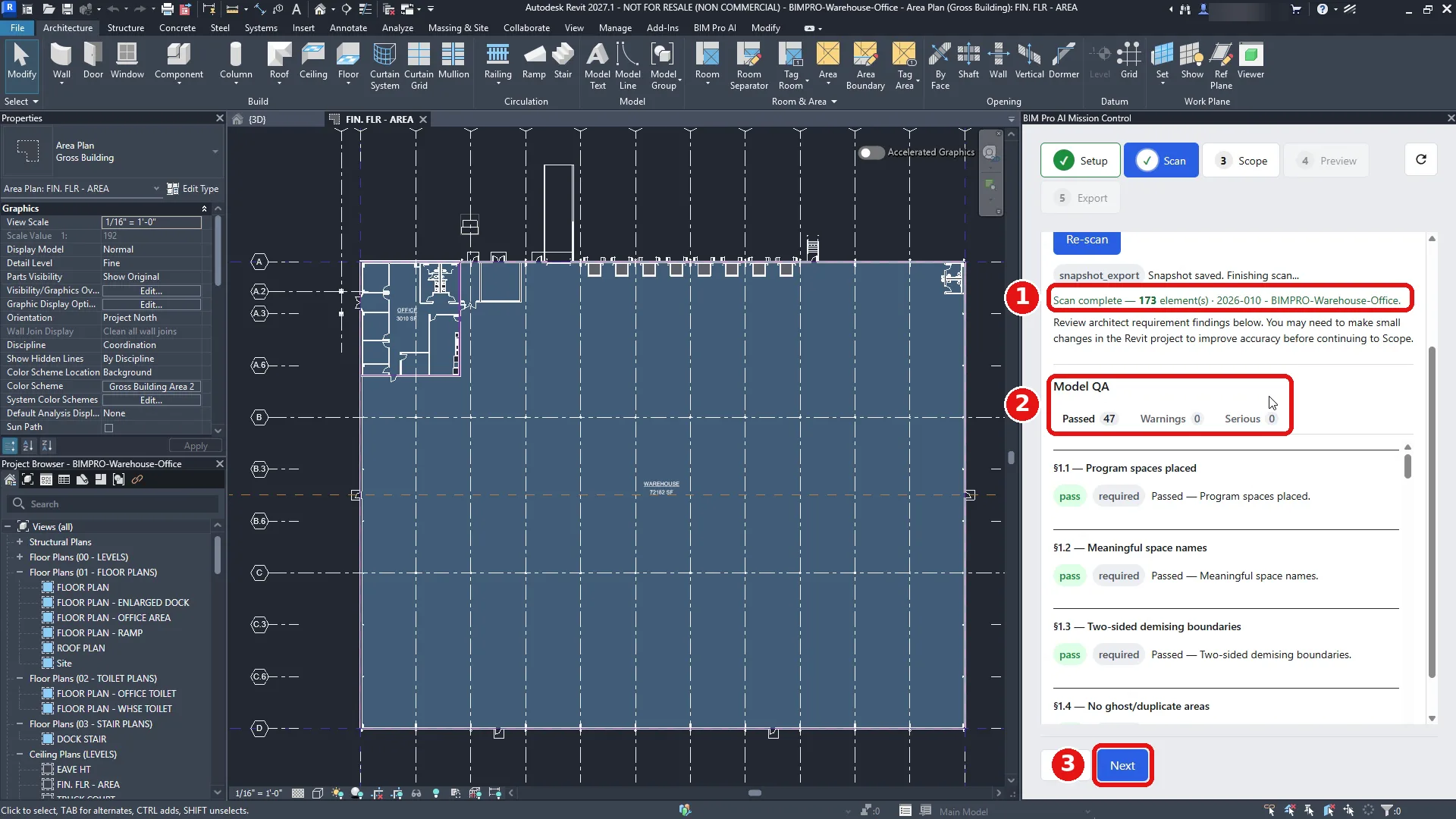
One click extracts walls, roofs, floors, and openings from the open model. The demo project scanned 173 elements.
Model QA runs on the result and sorts every check into Passed, Warnings, or Serious, so you fix the model before the numbers exist, not after a reviewer finds the problem.
3 · Scope
Pick the spaces. See the envelope in 3D.
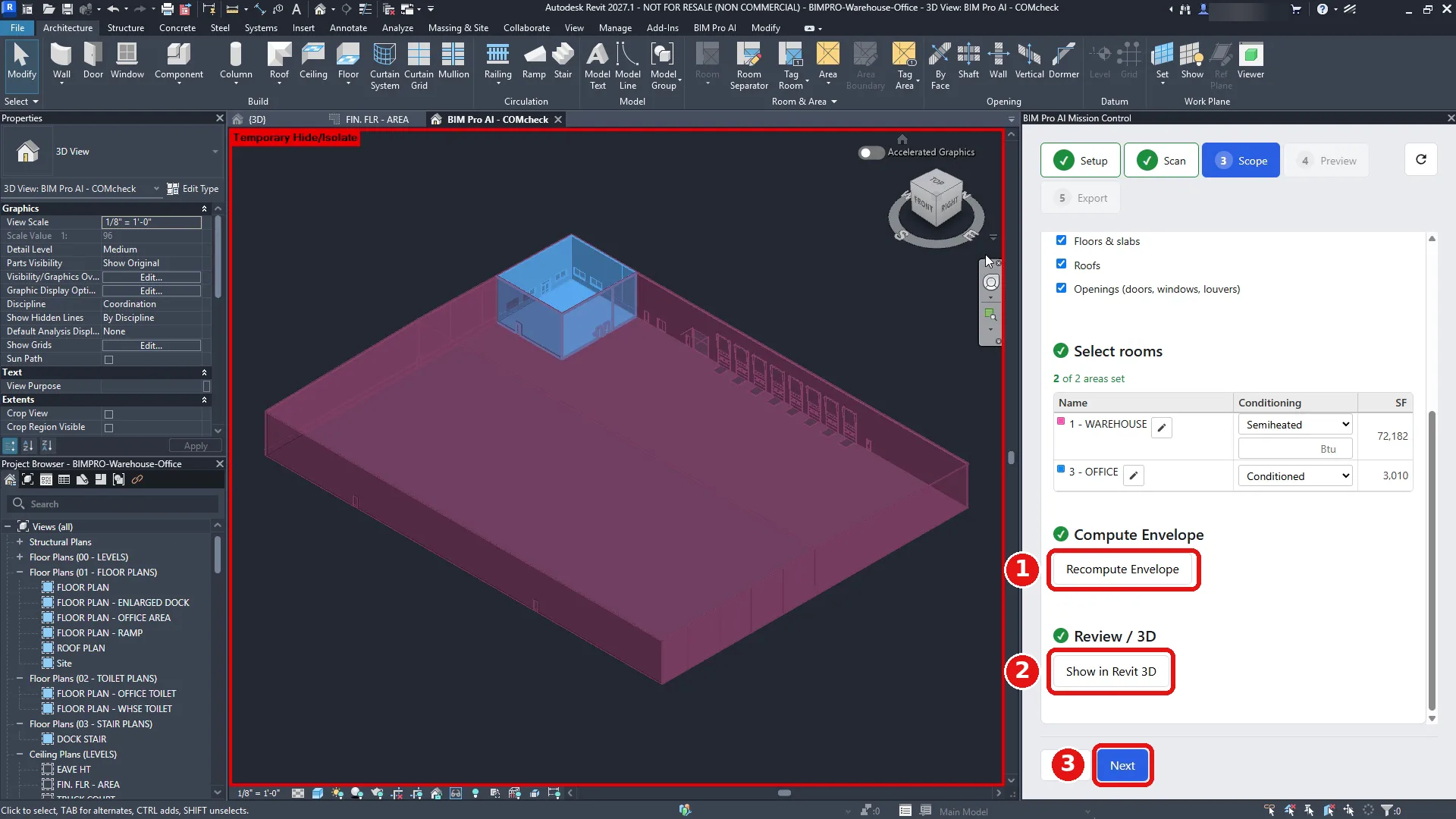
Set conditioning per area: in the demo, a semiheated warehouse and a conditioned office. Compute Envelope builds the thermal boundary from those choices.
Show in Revit 3D isolates exactly what was computed, colored by space. If something is in the wrong space, you see it here.
4 · Preview
Every value, before it leaves Revit.
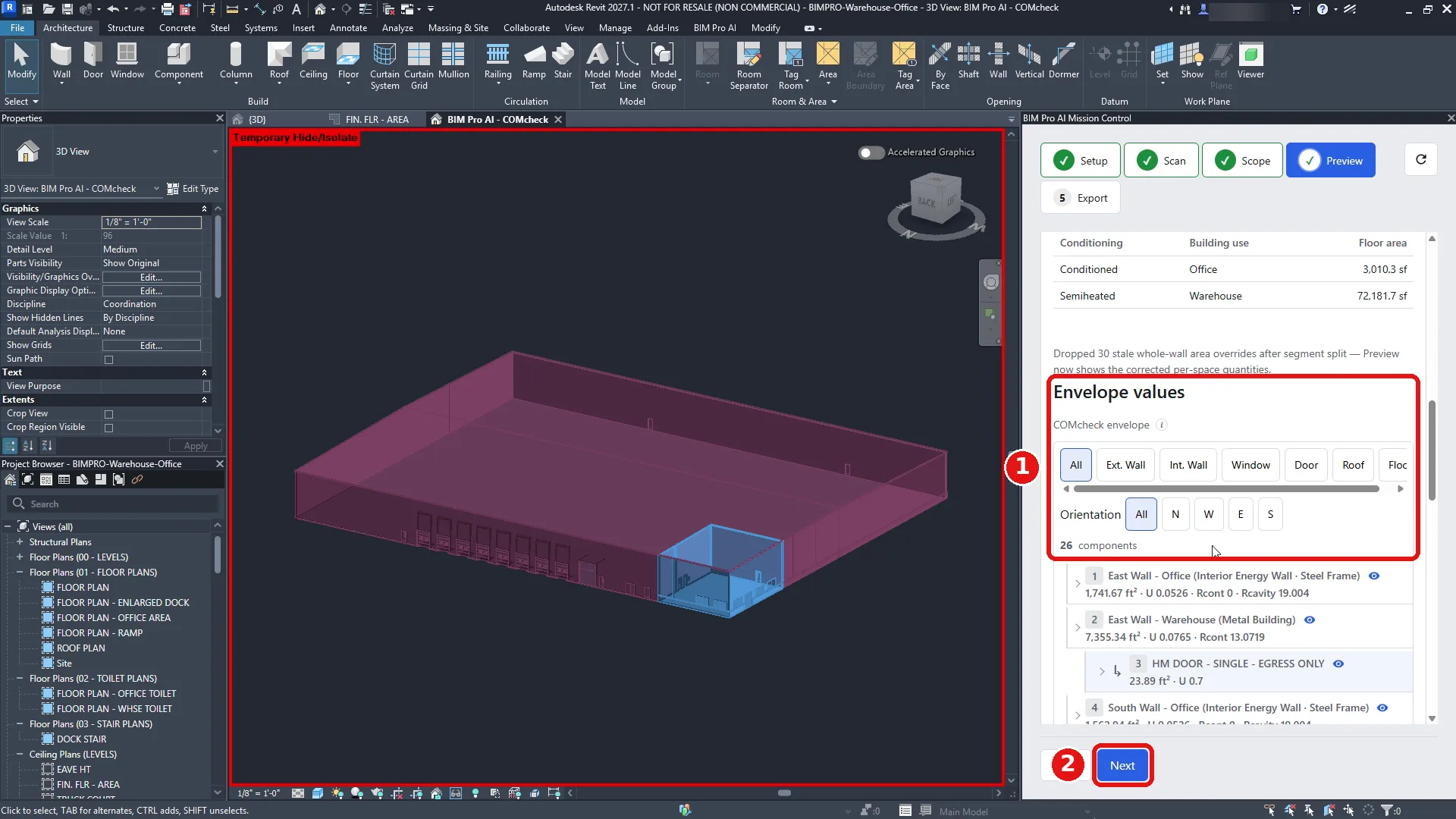
Every component that will go to COMcheck is listed with its area, U-factor, and R-values. Filter by wall, window, door, or roof, and by orientation.
Expand a wall to see the doors and windows it hosts. This is the list you check, not a summary of it.
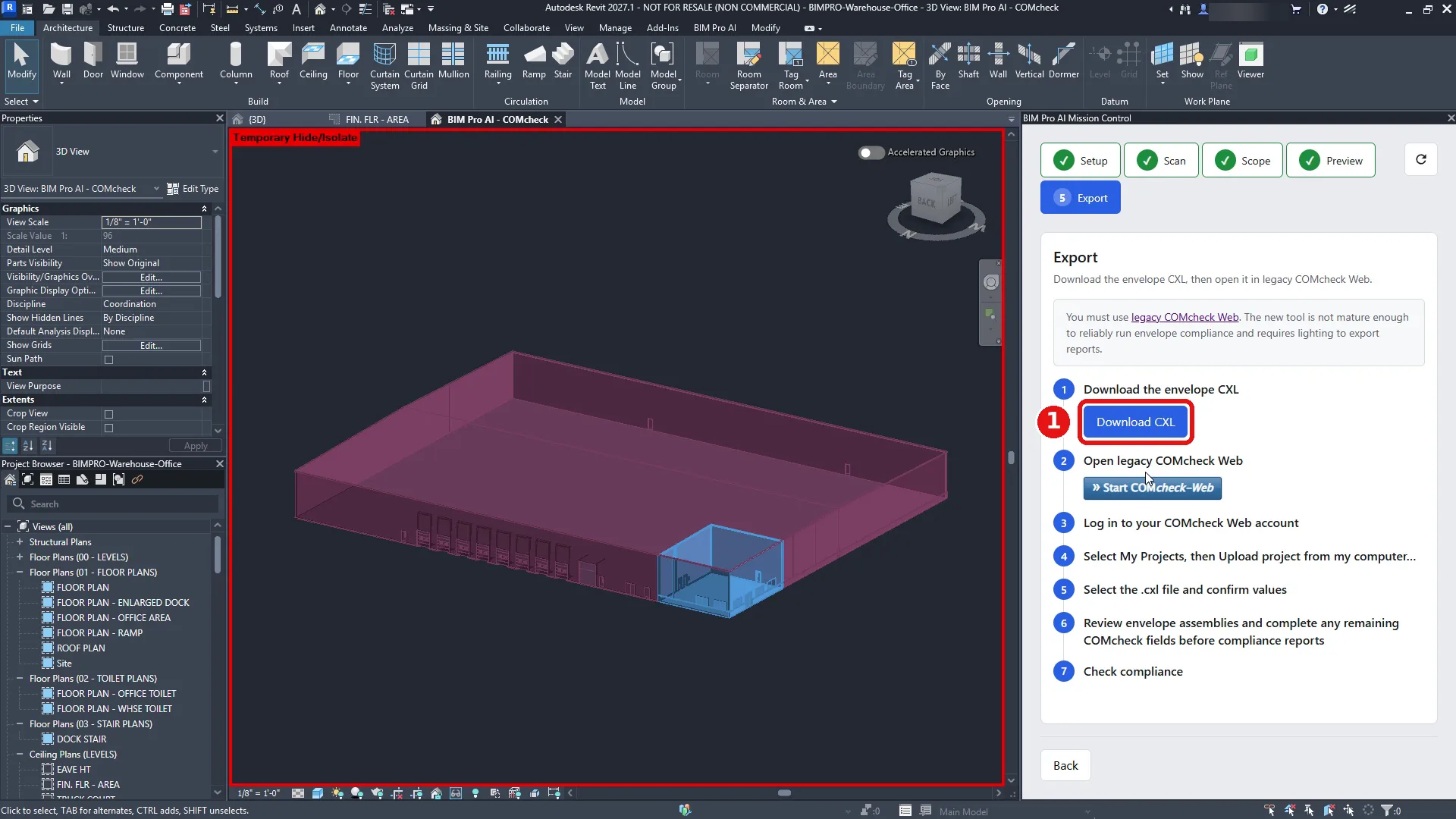
5 · Export
One .cxl file, and a checklist for what comes next.
Download CXL saves a COMcheck project file named for the project, code, and scope. The Export tab lists the remaining steps, and Start COMcheck-Web opens the legacy site in your browser.
6 · COMcheck-Web
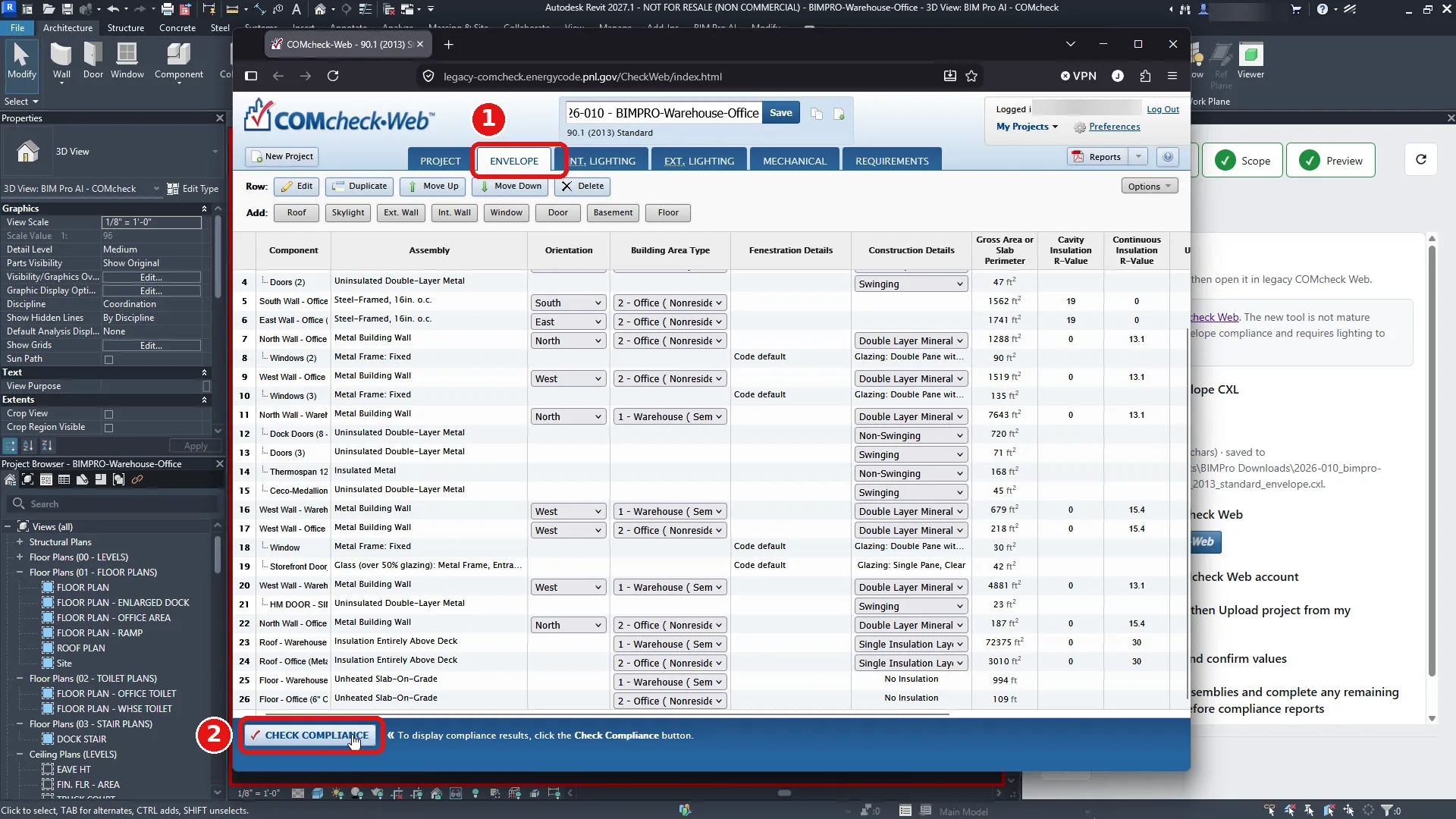
Upload it to COMcheck-Web. The envelope is already there.
Upload the .cxl from My Projects. Each wall, roof, floor, door, and window from Revit arrives as a row on the ENVELOPE tab, with its assembly, orientation, building area, and area already filled in.
Review it, complete anything COMcheck still needs, and run Check Compliance.
7 · The result
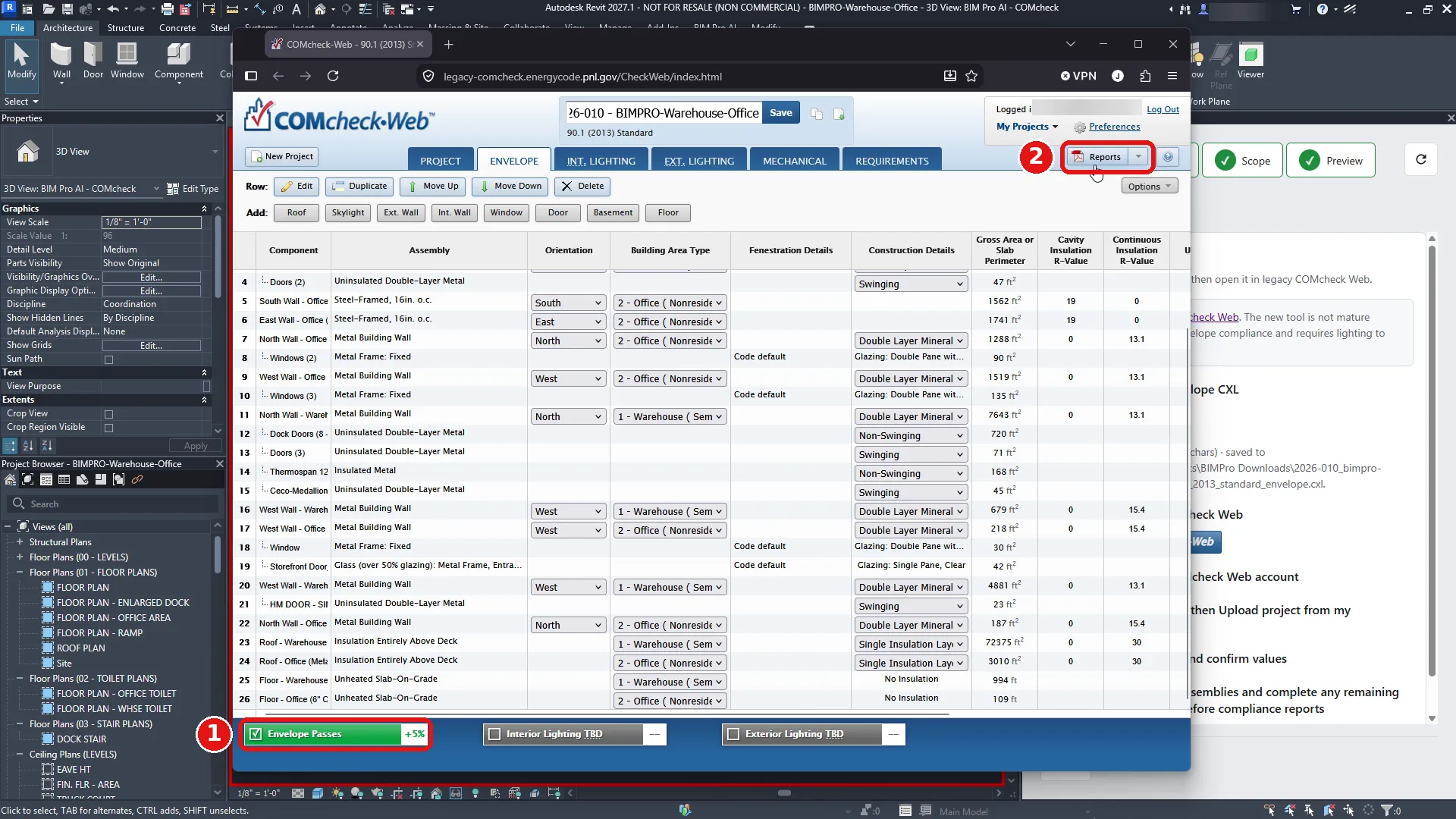
COMcheck calculates. COMcheck issues the certificate.
In the demo, the envelope passes by 5%. Reports produces the Envelope Compliance Certificate PDF, with project information, building areas, and envelope assemblies.
BIM Pro AI prepares the input. The compliance result and the certificate come from COMcheck-Web itself.
What it does not do
Envelope only. A draft for professional review.
- Interior and exterior lighting stay TBD in COMcheck. BIM Pro AI exports the envelope.
- It works with legacy COMcheck-Web. The new COMcheck-Web requires lighting before it will export reports.
- It does not submit anything. A licensed reviewer decides what goes to the permit office.
Questions
Revit to COMcheck: questions and answers
COMcheck and the export
Can I export a Revit model to COMcheck?
Yes, for the building envelope. The BIM Pro AI add-in scans the walls, roofs, floors, doors, and windows in your envelope, as set by your Area plan, and saves a COMcheck-compatible .cxl file you upload to legacy COMcheck-Web. Each component arrives on the ENVELOPE tab with its assembly, orientation, and area filled in. You review it and run Check Compliance in COMcheck.
Is there a COMcheck plugin for Revit?
BIM Pro AI is a third-party Revit add-in that automates the envelope export for COMcheck. It isn't made by, affiliated with, or endorsed by DOE, PNNL, or COMcheck.
Does this replace COMcheck?
No. BIM Pro AI fills in the envelope for you. COMcheck still runs the compliance check and issues the Envelope Compliance Certificate.
Can I submit the result for a permit?
The certificate you submit comes from COMcheck-Web. BIM Pro AI prepares the envelope input, and a licensed professional reviews and takes responsibility for what is submitted.
Does it work with the new COMcheck-Web?
Not today. The export opens in legacy COMcheck-Web, because the new COMcheck-Web requires lighting before it exports reports. DOE lists legacy COMcheck-Web as supporting the 2015, 2018, and 2021 IECC and ASHRAE 90.1-2013, 2016, and 2019, while newer codes such as 90.1-2022 and the 2024 IECC are added only to the new COMcheck-Web, as of October 2026. Check your project's code edition before you start.
Can I import a Revit gbXML file into COMcheck instead?
COMcheck can import gbXML, but DOE says the import covers envelope components only and groups surfaces with similar characteristics. BIM Pro AI reads the Revit elements directly, scopes them with your Area plan, and lets you check each value in Revit before export.
Does it export lighting or mechanical to COMcheck?
No. Only the envelope. Interior and exterior lighting stay TBD in COMcheck, and you complete them there.
AI and accuracy
Does BIM Pro AI use AI to calculate compliance?
No. The product uses no AI. A rules engine takes the scope you confirmed in Revit, applies the prescriptive envelope rules, and gives the same output for the same input every time.
Can I trace a value back to the model?
Yes. Each value is tied to the Revit elements that were in scope, so a question about an area or an assembly starts in the model, not in a spreadsheet.
Which energy code sources does it use?
The rules engine applies logic derived from publicly available code content and adopted energy code requirements for the prescriptive envelope path.
How is BIM Pro AI different from UpCodes or other code tools?
UpCodes and similar tools are research platforms for looking up code sections. BIM Pro AI starts from your Revit model: it extracts the envelope, runs the calculations, and prepares the COMcheck input.
Does it work for LEED or other green building certifications?
Many LEED energy paths reference the local energy code baseline, so the envelope export can support that work. BIM Pro AI isn't a LEED certification tool. Check certification requirements with your LEED reviewer.
Revit and model setup
Which Revit versions are supported?
Revit 2025, 2026, or 2027 on Windows. Download the installer that matches your Revit year from your account.
What do I need in my Revit model?
A Revit Area plan with Areas placed for each program space (Rooms alone aren't enough), wall and roof types named with their assembly (for example Tilt-up, IMP, or PEMB), and the finish grade elevation from civil. You also need a Windows PC with Revit 2025, 2026, or 2027, an internet connection, and a BIM Pro AI account linked to the Autodesk ID you use in Revit.
Do I sign in inside Revit?
No. You create the BIM Pro AI account in the browser and link your Autodesk account there. The add-in recognizes the Autodesk account already signed in to Revit, so there is no extra password.
Trial, seats, and billing
Is there a free trial?
Yes. It is a 30-day free trial, a card is required, and you won't be charged if you cancel before day 30.
Can my firm buy seats for the team?
Yes. An owner buys seats, invites the team, and each person claims a seat with their own Autodesk account. Larger purchases, volume pricing, and purchase orders can be quoted instead of paid online.
Is there an education discount?
No. Students and schools use the same trial and prices as everyone else. If you have a question about access for a class, contact us.
What if it doesn't work on my model?
Contact support and we'll work with you on your model until the export is right.
Data and privacy
Does BIM Pro AI store my Revit model data?
Not by default. Model data extracted by the add-in is processed to run the calculation you start and is not kept after your session. If you need help, you can turn on support sharing in your account settings. It is off until you turn it on, and it lets our support team download your last scan for 14 days so we can troubleshoot. You can revoke it at any time.
Try it on your own model.
Create an account, link Autodesk, and start a trial. The full walkthrough, with every click from Setup to the certificate, is in the docs.