Legacy COMcheck-Web vs the new COMcheck-Web
DOE now runs two versions of COMcheck-Web. Which one you use depends on your code edition and whether you are checking the envelope alone.
Updated
Which code editions each one supports
DOE lists legacy COMcheck-Web as supporting the 2015, 2018, and 2021 IECC and ASHRAE 90.1-2013, 2016, and 2019. Newer codes such as ASHRAE 90.1-2022 and the 2024 IECC are added only to the new COMcheck-Web, as of October 2026. Check DOE for the current list before you start.
Envelope-only checks
The new COMcheck-Web requires lighting before it will export reports. If you are checking only the envelope, for example on a shell building, legacy COMcheck-Web lets you run the envelope check and produce the Envelope Compliance Certificate with lighting left as TBD.
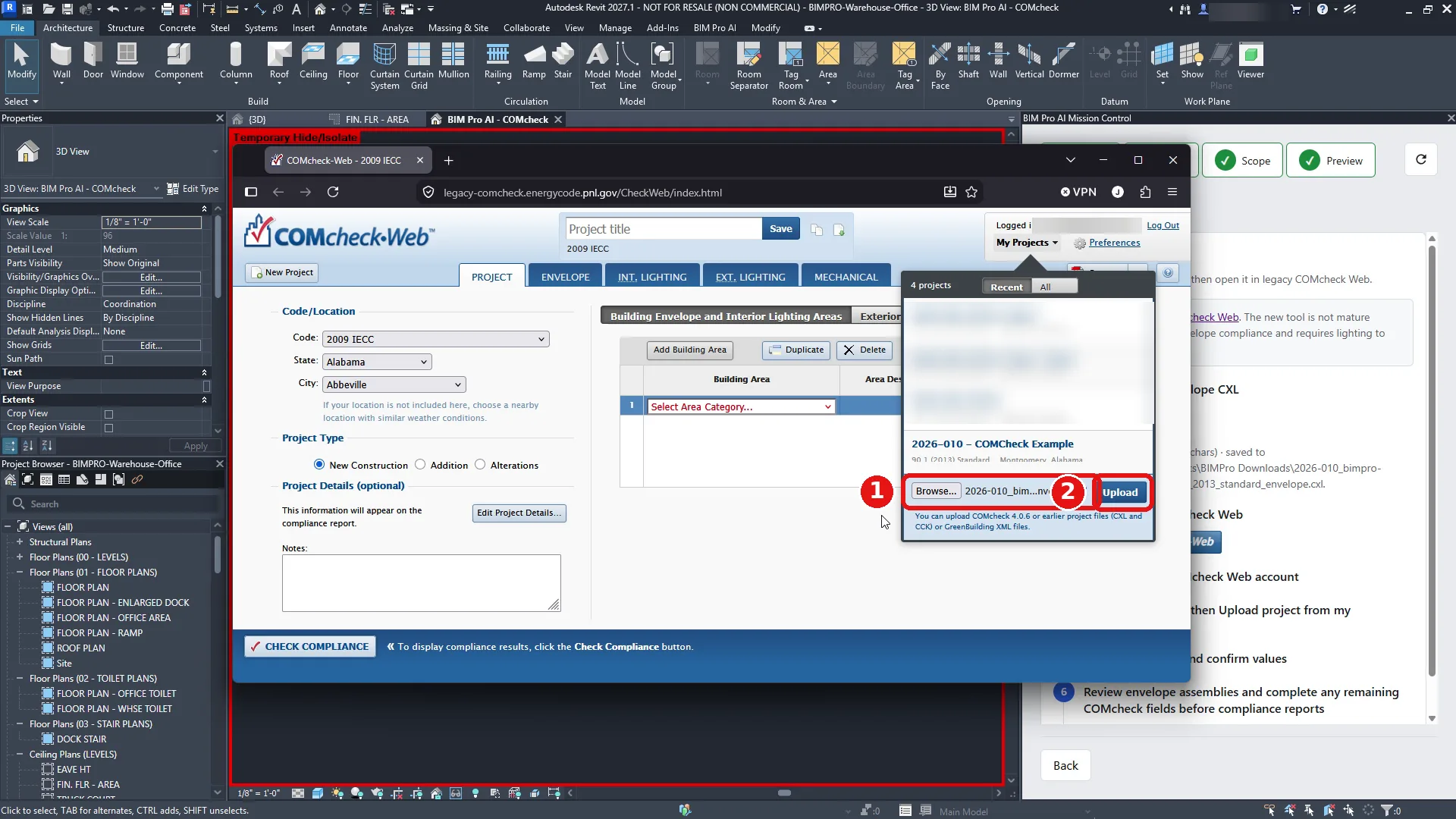
Uploading a project file to legacy COMcheck-Web
- Log in to legacy COMcheck-Web.
- Click My Projects, then Upload project from my computer.
- Click Browse, pick the .cxl, .cck, or gbXML file, and click Upload.
- Confirm the project shows the code edition from the file, not the default.
Exporting from Revit
BIM Pro AI exports the envelope from Revit as a .cxl file for legacy COMcheck-Web, and the Export tab opens legacy COMcheck-Web for you.
Worked example: an envelope-only check on 90.1-2013
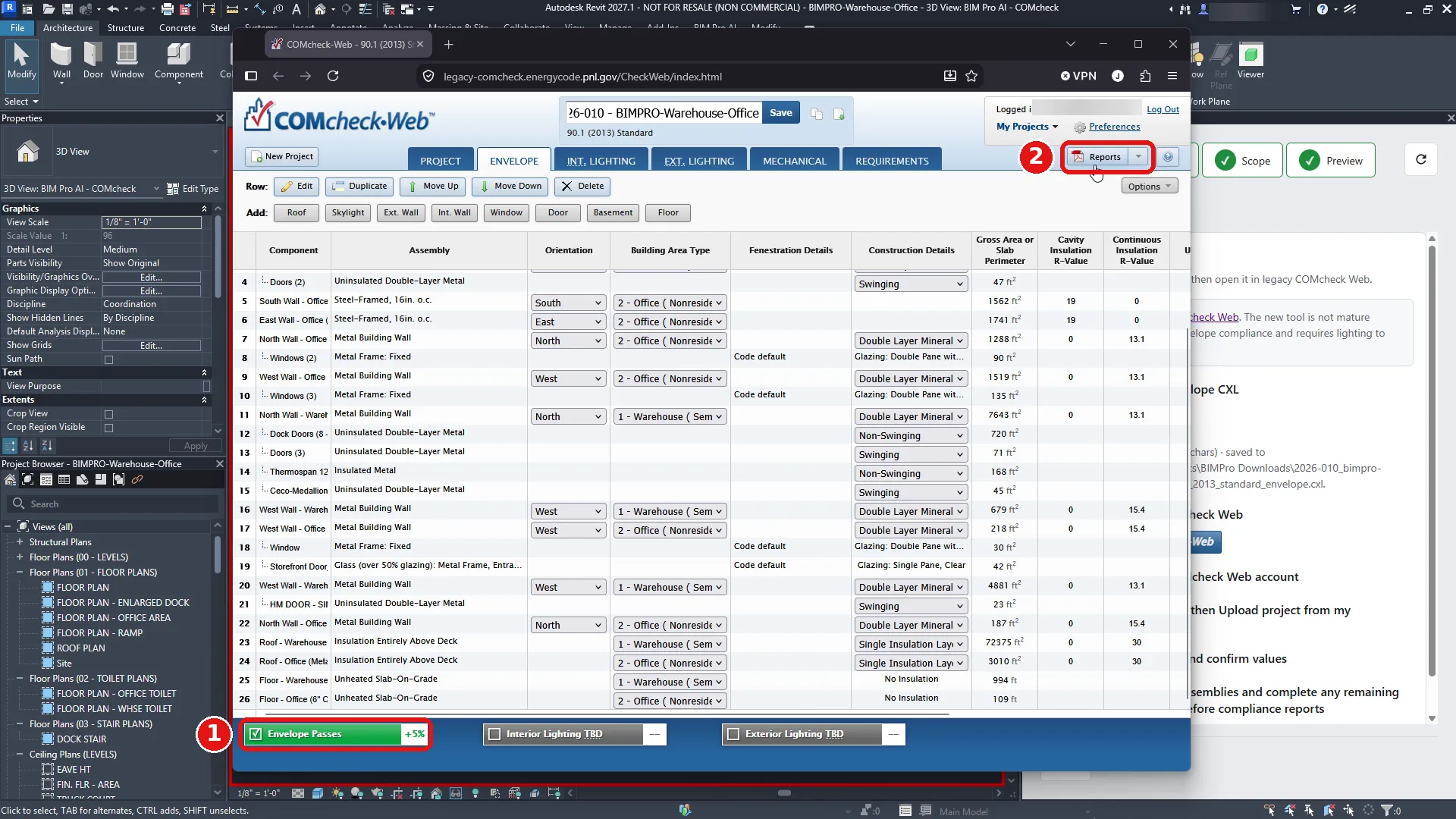
BIMPRO-Warehouse-Office is an envelope-only check: a 72,182 SF semiheated warehouse with a 3,010 SF conditioned office, on 90.1 (2013) Standard. Lighting was never part of the export. After Check Compliance, interior and exterior lighting stayed TBD, and the envelope result was Passes, +5%.
That result is available in legacy COMcheck-Web. DOE lists legacy as supporting 90.1-2013, along with 90.1-2016 and 2019 and the 2015, 2018, and 2021 IECC. The new COMcheck-Web is where 90.1-2022 and the 2024 IECC are added, and it asks for lighting before it will export reports. On this project, a tool that requires lighting first would stop the certificate even though the question being asked was only the envelope.
The file was 2026-010_bimpro-warehouse-office_90.1_2013_standard_envelope.cxl, produced after a scan of 173 elements, Model QA of 47 passed, 0 warnings, and 0 serious, and a preview of 26 components. One of those components is the east office wall, 1,741.67 ft², U-factor 0.0526. Upload used legacy COMcheck-Web: My Projects, Upload project from my computer, then Browse. Before that upload the site shows a default code, 2009 IECC. The check that the upload worked is the project header, which read 2026-010 - BIMPRO-Warehouse-Office on 90.1 (2013) Standard, not the default.
The Export tab in Revit lists the remaining work as a checklist: download the envelope CXL, open legacy COMcheck-Web, log in, upload the project from My Projects, confirm the values, review the envelope assemblies, and check compliance. Nothing on that list is a lighting entry. The new COMcheck-Web requires lighting before it will export reports. On a shell project, that is the difference between finishing the envelope certificate and stopping to enter lighting you are not submitting.
Check Compliance on the envelope took about four minutes. Reports then opened the Envelope Compliance Certificate. The PDF is 13 pages and includes project information, the construction site, owner and designer blocks, building area, and envelope assemblies. Later pages include other certificates, such as interior lighting, which stay incomplete when lighting was left TBD.
If the project is on a code edition only the new COMcheck-Web supports, this path does not apply. 90.1-2022 and the 2024 IECC are not in the legacy tool, as of October 2026. If the project is on 90.1-2013, as this demo is, and you only need the envelope certificate, legacy COMcheck-Web is the version that will issue it with lighting still TBD.