Revit gbXML to COMcheck: what the import does, and what to check
COMcheck-Web can import a gbXML file exported from Revit. Here is what that import covers, what to check afterward, and when a direct export is faster.
Updated
Short answer
You can upload a Revit gbXML file to legacy COMcheck-Web, and the importer will build envelope rows from it. It will not build lighting, and it will not keep every surface as its own row: DOE says surfaces with similar characteristics are grouped. The review after upload is where you find out whether those groups still match the assemblies, areas, and building areas in the model.
How the gbXML route works
- Set up the energy model in Revit and export a gbXML file.
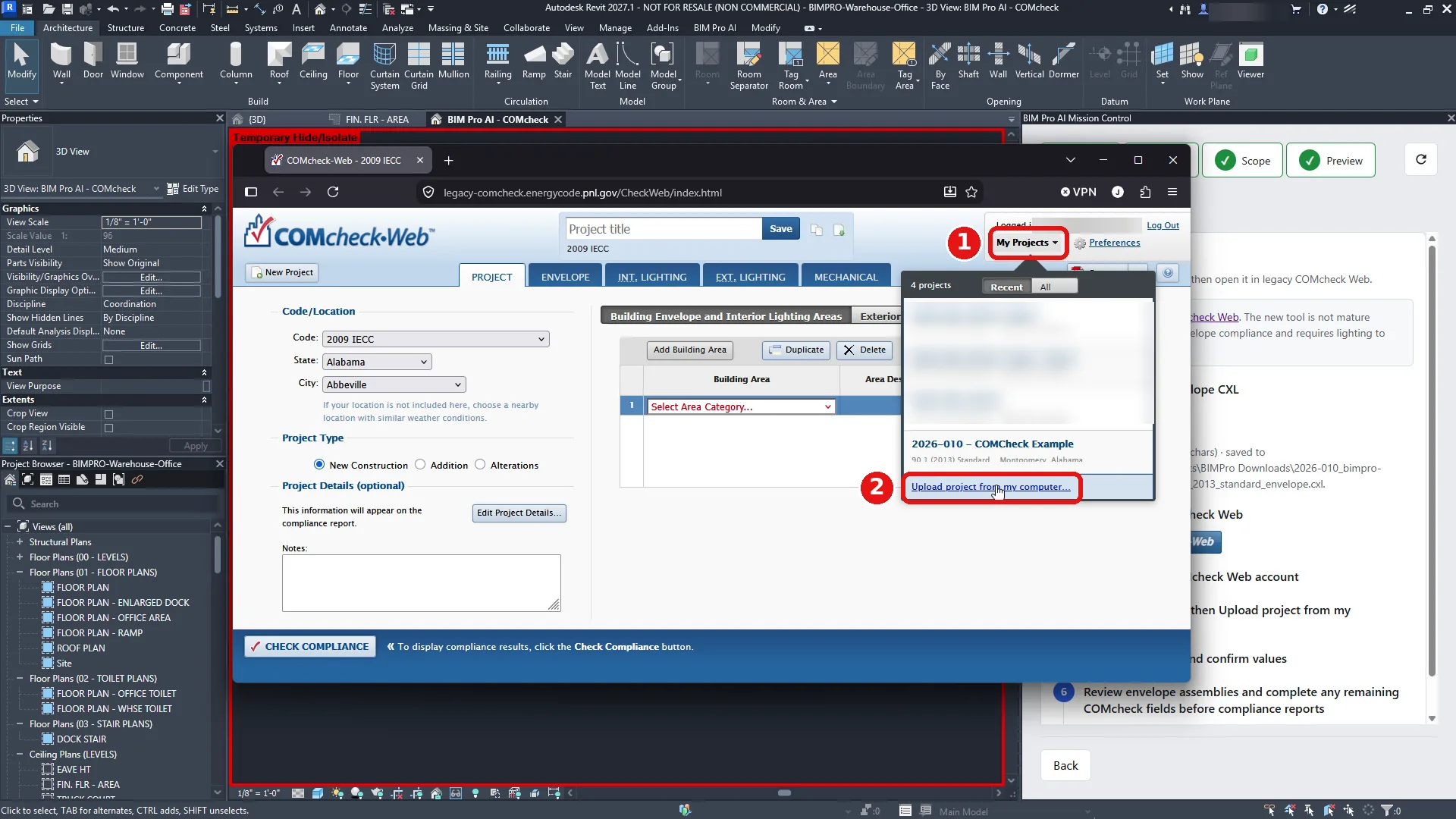
- In legacy COMcheck-Web, open My Projects and choose Upload project from my computer.
- Browse to the gbXML file and upload it. The upload accepts COMcheck project files (CXL and CCK) and GreenBuilding XML files.
- Open the ENVELOPE tab and review what was imported.
What to check after the import
- Grouped surfaces: confirm that walls, roofs, and floors that were combined still match the assemblies you intend to report.
- Areas: compare gross wall, roof, and floor areas with your Revit schedules.
- Openings: check that windows and doors are attached to the right walls and orientations.
- Assemblies: confirm each component has the construction and insulation values you expect.
- Building areas: make sure each component is linked to the right building area type.
A direct Revit to COMcheck export
BIM Pro AI is a Revit add-in that reads the walls, roofs, floors, doors, and windows directly from the model, scopes them with your Area plan, and shows every component with its area, U-factor, and R-values before export. It saves a .cxl file you upload the same way, and each component arrives on the ENVELOPE tab already filled in.
Worked example: the warehouse and office demo
The screenshots in the Revit to COMcheck walkthrough come from one model, BIMPRO-Warehouse-Office. It is a 72,182 SF semiheated warehouse with a 3,010 SF conditioned office, checked against 90.1 (2013) Standard. The Area plan is FIN. FLR - AREA, and the spaces that were reported are 1 - WAREHOUSE and 3 - OFFICE.
That split is the part a grouped gbXML import makes you reconstruct. The importer brings in envelope surfaces and combines surfaces that look alike. On a shell building, a warehouse wall and a steel-frame office wall should not collapse into one row, and the warehouse should stay semiheated while the office stays conditioned. After a gbXML upload you confirm those groups on the ENVELOPE tab, with the model open beside you.
The same model was also exported directly from Revit, which is the list you can compare a grouped import against. The scan read 173 elements. Model QA listed 47 checks passed, 0 warnings, and 0 serious, including the check that program spaces were placed. Scope then set conditioning per area: semiheated for the warehouse, conditioned for the office. Compute Envelope built the thermal boundary from those two areas. Show in Revit 3D isolated that boundary, the office in one color and the warehouse in another, so a space on the wrong side of the line is visible before export.
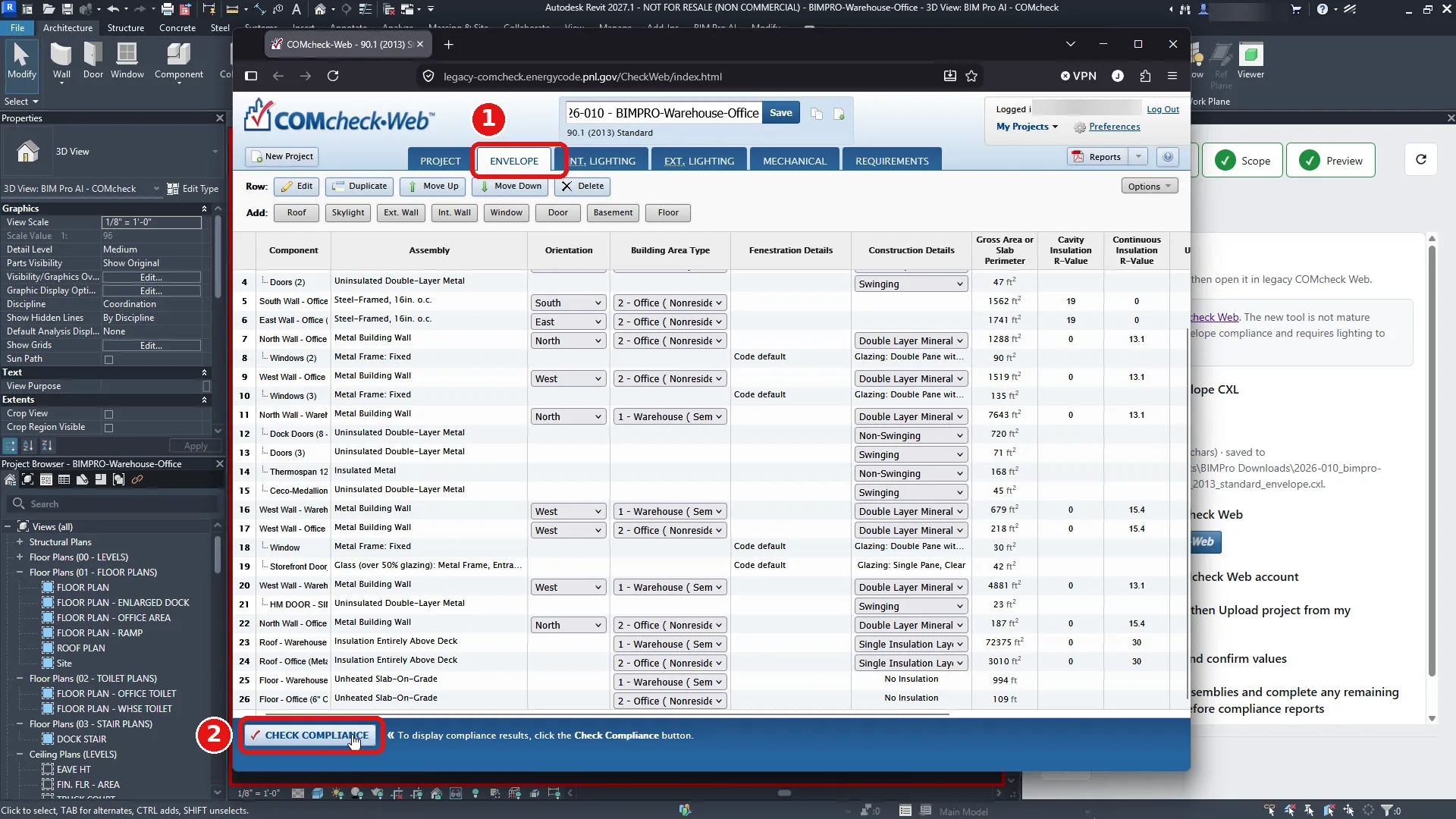
Preview listed 26 envelope components, filterable by type and orientation. One row is the east office wall: Interior Energy Wall, steel frame, 1,741.67 ft², U-factor 0.0526, continuous insulation R-0, cavity insulation R-19.004. Expanding a wall shows the doors and windows it hosts, which is the relationship a grouped surface import is most likely to blur.
Download CXL saved 2026-010_bimpro-warehouse-office_90.1_2013_standard_envelope.cxl. In legacy COMcheck-Web, My Projects, then Upload project from my computer, accepted that file. Before the upload, COMcheck-Web shows its own defaults (2009 IECC). After the upload, the project read 2026-010 - BIMPRO-Warehouse-Office on 90.1 (2013) Standard. The ENVELOPE tab held the walls, doors, windows, roofs, and floors from the model. Check Compliance took about four minutes and returned Envelope Passes, +5%. Interior and exterior lighting stayed TBD, which is expected for an envelope-only file. Reports then produced the Envelope Compliance Certificate, a 13-page PDF.
Those are the numbers to compare if you try the gbXML route on this model or on your own: component count, area and U-factor for a wall you can point at in Revit, building-area conditioning, and the code edition on the project after upload. If a grouped import cannot show the east office wall as its own row, the distinctions the model already had have been collapsed, and you are putting them back by hand.